 Source: Lucas Gouveia/Android Police | Nero1255/Shutterstock
Credit:
Source: Lucas Gouveia/Android Police | Nero1255/Shutterstock
Credit:
 By
Chethan Rao
Published 56 minutes ago
By
Chethan Rao
Published 56 minutes ago
Chethan is a reporter at Android Police, focusing on the weekend news coverage for the site. He has covered tech for over a decade with multiple publications, including the likes of Times Internet, Guiding Tech, and Android Headlines, to name a few. Chethan's love for Android dates back to the days of the Samsung/Google Nexus S, with his first Android phone being the HTC Desire HD back in 2010. Away from work, he's on the lookout for live cricket streams or NBA highlights. He also enjoys the occasional hour or two of console/mobile gaming whenever time permits.
Sign in to your Android Police account Summary Generate a summary of this story follow Follow followed Followed Like Like Thread Log in Here is a fact-based summary of the story contents: Try something different: Show me the facts Explain it like I’m 5 Give me a lighthearted recapThere are several ways to scan your documents or files on an Android smartphone. Perhaps the easiest way to achieve this feat is through Google Drive or Files by Google, both of which offer instant access to document scanning.
Following the Material 3 Expressive revamp of Drive's scan editor page back in September, Google is about to bring Android's latest design language to the document scanning interfaces of the Drive and Files apps as well.
As first reported by 9to5Google, some users of the Drive and Files by Google apps are seeing a pop-up to try the updated document scanner interface (in beta). The redesign isn't live on my device just yet, though the folks at 9to5 are seeing the updated interface.
In addition to being "a faster, smarter way to scan," the revamped scanner can capture "all pages in view at once," thereby making it significantly easier and faster to scan multipage documents, receipts, or books.
A welcome refresh to the document scanning interface
One of the first changes you'll see is to the viewfinder, which is placed in a familiar M3 Expressive container. The squiggly progress indicator is also immediately noticeable, though it turns into a conventional (non-squiggly) progress indicator when the document is scanning. Meanwhile, the image/file picker button sits to the left of the dynamic progress indicator, while the manual capture button is on the right.
A right-arrow button at the bottom-right of the screen moves the user to the scan editor interface. Additionally, there's an 'X' at the top left to close the scanner, while a button to toggle the camera flash sits at the top right. There's also a Workspace Labs logo next to the flash toggle, which reportedly switches users to the older layout.
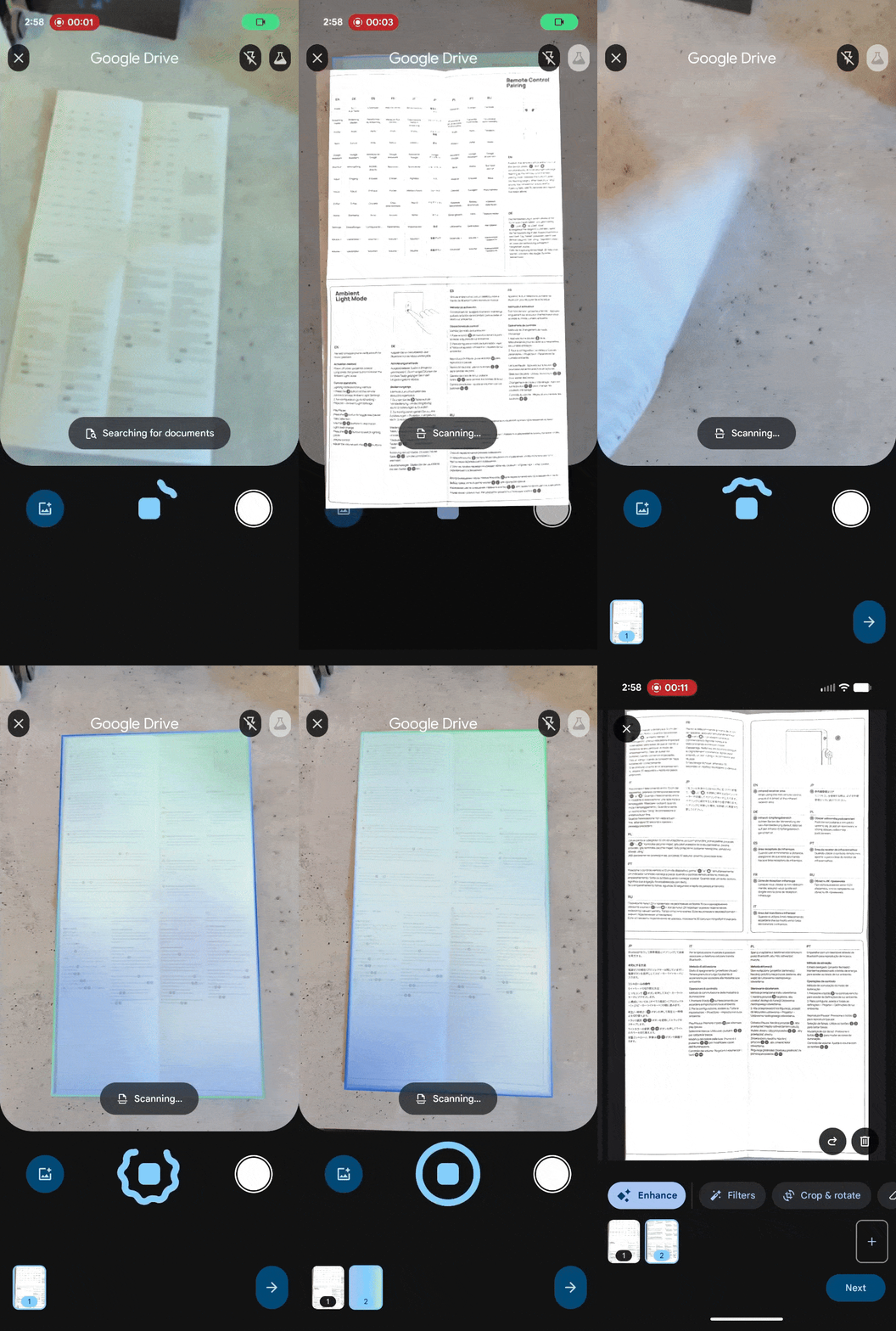 Credit: 9to5GoogleClose
Interestingly, this isn't the first time we've seen the Material 3 Expressive makeover of the document scanning interface, as it was uncovered by the folks at 9to5Google just over two months ago. We learned back then that this updated interface will be available (at least initially) through the Workspace Labs program, which offers early access to experimental AI features from Google.
The updated scanning interface was reportedly spotted in version 25.46.32 of Google Play services (stable). However, I do not see it in the Google Drive and Files by Google apps on my Pixel device, which have the same Play services version and an account signed up for Workspace Labs.
This indicates the redesign is only available to users in certain parts of the world, though that could change imminently. Are you seeing this updated document scanning interface in Google Drive or Files? Let us know below.
-
 Applications
We want to hear from you! Share your opinions in the thread below and remember to keep it respectful.
Be the first to post Images Attachment(s) Please respect our community guidelines. No links, inappropriate language, or spam.Your comment has not been saved
Send confirmation emailThis thread is open for discussion.
Be the first to post your thoughts.
- Terms
- Privacy
- Feedback
 3 days ago
Samsung's Now Brief may soon offer improved YouTube and Spotify recommendations
 2 days ago
How to turn off Gmail 2FA
 3 days ago
7 useful built-in Samsung One UI apps you're probably not using — but you should be
 1 day ago
I found the best notes app for every device, and I wasn't disappointed
Trending Now This YouTube ad glitch is wrecking the viewing experience
 The best phone of 2025 just got its biggest price cut to close out the year
 Samsung’s Galaxy Z TriFold is official, with a surprise we weren’t expecting